|
|
 | |

|
|
|
TESIS/SSO4
(Single Sign On) |
|
|
|
|
|
|
|
Authenticate
just as you wish |
|
|
TESIS/SS04
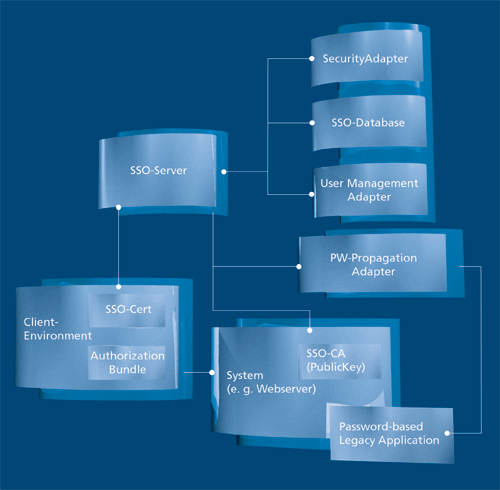
TESIS/SS04 is a development of the successful TESIS/SSO (Version 3) Single Sign On solution for password propagation and constitutes a part of the TESIS Security Framework. You authenticate yourself in your system just once, and the SSO software executes log-ins to all other systems and applications. The Single Sign On client software communicates with your mail system and host emulation, with databases, internet and intranet applications, and with many other systems and applications requiring log-in. TESIS/SSO4 displays authorization data as icons on your workstation; the user only need click on the icon with the mouse, and they are logged in.
Authentification
Users decide how they wish to be identified as an authorised person by TESIS/SSO4: Classically, with user ID and password, with a biometric process (e.g. voice identification), or with a smartcard.
More security - even for insecure systems
TESIS/SSO4 administrates the user's virtual login information required for authentification in systems and applications in a database. The options here again cover everything from simple user ID/password pairs and smartcards with key pairs, certificate and PIN through to a solution for insecure target systems. For these vulnerable systems (e.g. Network Information Systems) suitable passwords for maximum security are generated and administrated automatically. Thus, there is no longer the need to make any compromises for all other passwords. TESIS/SSO4 always guarantees the maximum degree of security possible.
|
|
|
|
Supported platforms
The SSO server can be installed on every platform which is accessible from JDK 1.4. SSO is based on a replication-capable database (e.g. Oracle from Version 8.1 onwards) or a suitable directory service (e.g. Sun One Directory Server).
The SSO client is available for Windows NT4, Windows 2000 and Windows XP and will be available for UNIX systems and Mac OS in the future.
Target systems, for which Sign On can be run, are:
• Oracle from Version 8 upwards
• Linux
• Windows NT4, Windows 2000 and Windows XP
• OS/390, z/OS
• SAP
• internet/intranet applications with HTTPS and two-way
authentification
• internet/intranet applications with HTTP
• Netscape/Mail
• LotusNotes
|
|
|
read
more

|
|
|
|
| |



 TESIS
Home
TESIS
Home